Reading your CAMS or KFintech CAS: what each line means and the five problems it hides
A line-by-line guide to the CAMS or KFintech CAS, and the problems the summary page hides...

Contents
The detailed Consolidated Account Statement lists every mutual fund folio linked to your PAN and email, across fund houses, with every transaction. Most apps show only the folios opened through them. The CAS shows all of them, including the folio opened through your bank in 2019 and the SIP you thought you had stopped.
This guide covers how to get the right version, what each line in it means, and the five problems that turn up in most statements once you know where to look.
Which CAS to request
There are two statements with the same name. The depositories (NSDL and CDSL) send a CAS, monthly when there has been a transaction and otherwise half-yearly, that covers demat holdings and lists mutual fund folios too. The one you want for a review is the mutual fund CAS produced jointly by the two registrars, CAMS and KFintech, which covers every fund house.
That statement comes in two versions:
- Summary CAS: current holdings and value per folio. Useful for a quick net-worth check. Not enough for a review, because it has no transactions.
- Detailed CAS: every transaction in the period you choose, with units, NAV and running balance. This is the one.
Request it from the CAMS website (Investors, then Statements, then "CAS - CAMS+KFintech"), from the KFintech site, or from MF Central, the joint portal both registrars run (MF Central needs a sign-up, and you download the file from the portal). On the CAMS and KFintech forms you enter the email registered with your folios (PAN is optional), pick "detailed", choose "specific period" and set the start date to before your first investment; one request covers the full history. Tick the option to include zero-balance folios. You set the PDF password yourself on the form, and the file arrives by email.
One statement covers only the folios linked to that email. If you have invested with two email addresses, request it for both and merge.
What each line in a folio block means
The detailed CAS is organised by fund house, then by folio. Each folio block has the same structure.
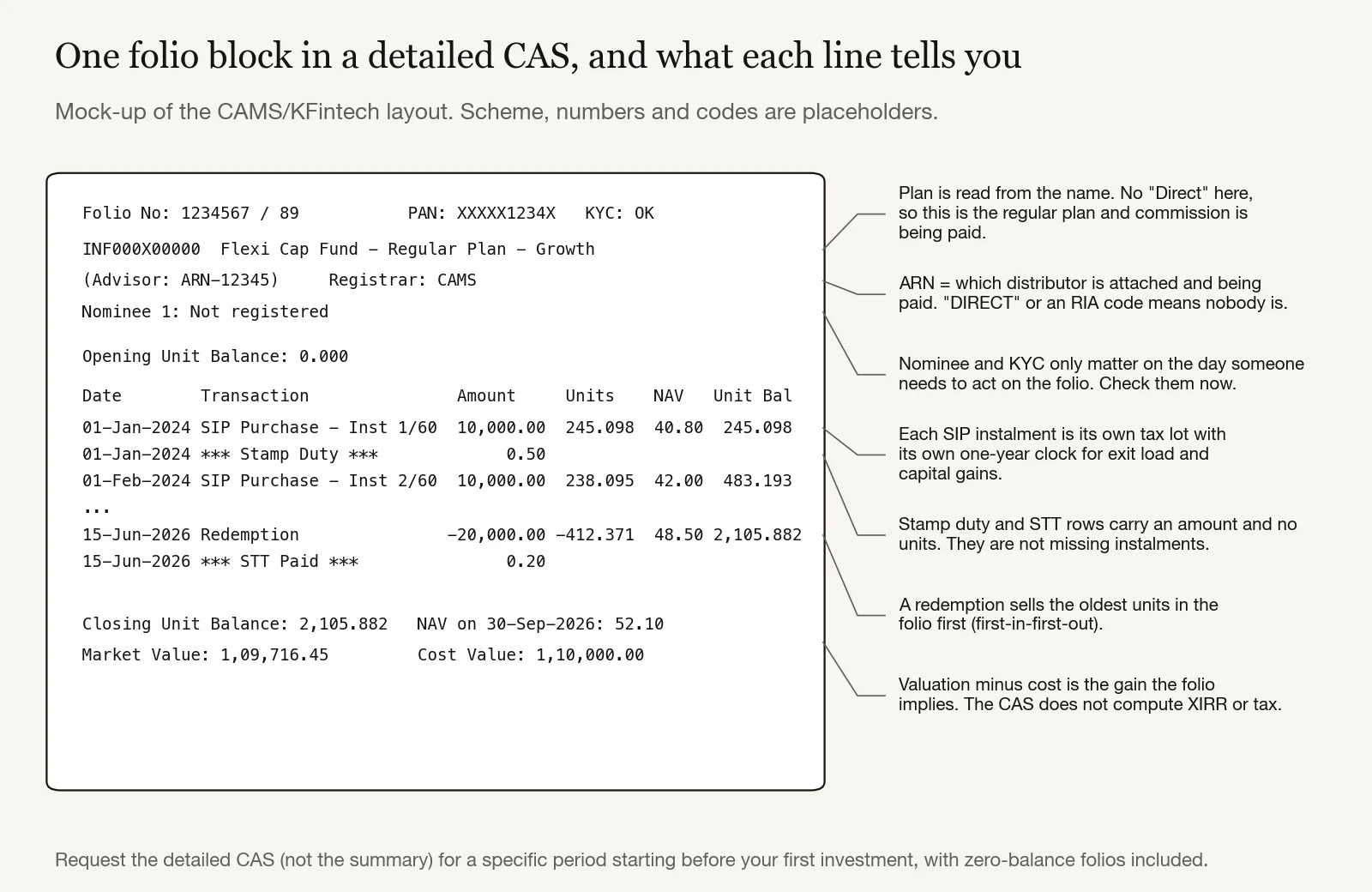
The transaction descriptions are the part that takes practice:
- Purchase or SIP Purchase - Instalment n/n: money in, units allotted at the NAV of the day the money reached the fund before cut-off, which can be a day or two after the SIP date.
- Redemption or Systematic Withdrawal: units out.
- Switch In / Switch Out: a move between schemes of the same fund house, usually within the same folio, shown as two rows under two scheme blocks. The switch-out takes the order day's NAV and the switch-in is allotted a day or more later, so the two dates often differ.
- IDCW (formerly dividend): a payout, or, under the reinvestment option, units allotted without new money going in.
- Stamp duty and STT: stamp duty of 0.005% on purchases, SIPs, switch-ins and IDCW reinvestments since July 2020; STT of 0.001% on redemptions and switch-outs of equity-oriented units. Both print as separate rows with an amount and no units. A distributor transaction charge of ₹100 or ₹150 can also appear on some older regular-plan purchases.
- Reversal or Rejection: units that were allotted and then reversed, for example when a debit was dishonoured after allotment. A SIP debit that simply bounced usually leaves no row at all, which is why gaps in the instalment numbering are worth noticing.
The five problems a summary view never shows
1. A distributor code on a folio you manage yourself
The Advisor line is the most ignored field on the statement. The plan is read from the scheme name; a regular-plan block with an ARN against it means the plan's higher expense ratio includes that distributor's trail commission, which accrues daily. A folio opened through a bank or an app carries that distributor's ARN for as long as the units stay in the regular plan, even if you have not used their service since. The regular vs direct guide shows how to put a rupee figure on it.
2. Duplicate folios of the same scheme
Buying the same scheme twice without quoting the existing folio number, or through two platforms, creates two folios. Each has its own transaction history, and exit loads run per unit lot inside each. The summary view adds them up and hides the split. Consolidating folios with identical holders and details is an administrative request to the registrar, not a transaction, and it has no tax effect. Merging a regular-plan holding into a direct plan is a switch, which is taxable.
3. Orphan balances and SIPs that did not stop
A SIP pause is time-limited, usually one to six months, after which the debits resume and the bank mandate is still live. A SIP that was cancelled leaves behind a folio with a few thousand rupees that will sit there for a decade. The detailed CAS, requested with zero-balance folios included and a start date before your first investment, shows the last instalment in each folio, which is how you find both. Look for folios whose last purchase row is months old and whose closing balance is small.
4. IDCW payouts you did not plan for
A scheme under the IDCW payout option sends money to your bank periodically. It is taxed as income at your slab rate in the year received, with 10% TDS once payouts from one fund house exceed ₹10,000 in a financial year, and it reduces the NAV of your units. Many people hold IDCW options chosen for them years ago. The scheme name on the folio tells you, and the IDCW rows in the transactions show how much has been paid out.
5. Missing nominees and unverified KYC
Older folios often show blank nominee fields. Nomination has been required for single-holder folios since 2022 unless you opt out, and SEBI's May 2026 circular, in force from September 2026, allows up to three nominees and six-monthly reminders rather than a freeze. KYC prints on the CAS as "OK" or "NOT OK"; a folio whose KYC is on hold at the KRA will reject the next transaction. Neither affects returns. Both become a problem on the day you or your family need to act on the folio. The CAS lists the status for every folio on one page, which is faster than checking each fund house.
What the CAS does not tell you
Four things a review needs that the CAS does not contain:
- Overlap and concentration. The CAS lists schemes, not the stocks inside them. That needs each scheme's monthly portfolio disclosure.
- Expense ratios. The plan name tells you regular or direct, but the rate comes from the AMC's scheme page.
- Benchmark comparison.XIRR has to be computed from the transaction rows and set against the scheme's Total Return Index benchmark over the same dates.
- Capital gains by lot. The CAS lists transactions; it does not compute gains. CAMS and KFintech issue a separate capital gains statement for the financial year, and a lot-by-lot view before you redeem needs the purchase rows matched to the redemption in order.
A reading order that works
- Request one detailed CAS with a start date before your first investment, for every email address you have used, with zero-balance folios included.
- Go folio by folio and note four things: plan (regular or direct), ARN, option (growth or IDCW), closing value.
- Mark any folio under 2% of the total, any duplicate scheme, any "Not registered" nominee, any "Not verified" KYC.
- For each regular-plan folio, pull the scheme's regular and direct expense ratios.
- Only then look at returns.
An hour with the statement in this order surfaces problems the app's holdings view does not display.
Frequently asked questions
How do I get my mutual fund CAS?
From the CAMS website, the KFintech website or MF Central. Enter your registered email (PAN is optional), choose detailed, choose a specific period starting before your first investment, and set a password. CAMS and KFintech email the PDF; MF Central lets you download it.
What is the difference between summary and detailed CAS?
The summary shows current holdings and value per folio. The detailed version adds every transaction with units and NAV, which is needed for any review of returns, tax or costs.
What does ARN on my CAS mean?
ARN is the AMFI registration number of the distributor attached to that scheme block. Against a regular-plan holding it means the distributor receives trail commission from that plan's expense ratio.
Can I get a CAS for all my investments, not only mutual funds?
The depository CAS from NSDL or CDSL covers demat holdings such as stocks and ETFs and also lists your mutual fund folios. For mutual fund transactions in full, use the CAMS and KFintech statement.
Why does my CAS not show a fund I own?
The folio may be registered under a different email address or PAN (a joint holding, or a minor's folio with a guardian). Request the statement for each email you have used.
Related guides
- What a portfolio health check should cover, and why XIRR alone misleads
- Regular vs direct plans: what commission has cost you, in rupees
- Mutual fund overlap across your whole portfolio
- Tracking every investment in one place: what each statement covers
- Uploading your CAS to ChatGPT: what it gets right, what it misses, where the file goes
- Old or new tax regime for a salaried person in 2026-27
Sources: AMFI investor page and FAQ on the Consolidated Account Statement (joint CAMS and KFintech service, summary and detailed versions); CAMS and KFintech statement request forms; MF Central; AMFI note on the applicable-NAV rule in force from 1 February 2021; SEBI nomination circular of 29 May 2026; Income-tax Act, 2025, section 393 on TDS on IDCW. Corpus has applied to SEBI for registration as an investment adviser. This page explains how the rules and statements work and does not recommend any scheme. Investment in securities market are subject to market risks. Read all the related documents carefully before investing.
This is the lead-generation form
Get info from your blog visitors for lead funnel
Corpus
Guides on reviewing a mutual fund portfolio in India: reading your CAS, overlap, commission, what advice costs and who may legally give it. Written by the Corpus team.
Visit Site